














What is a DDoS attack?
A DDoS attack is one of the most terrifying threats in the IT world. Distributed Denial of Service (DDoS) is a form of cyberattack considered among the most dangerous.
DDoS Attacks: What You Need to Know
A DDoS attack is one of the most terrifying threats in the IT world. When you hear that a website has been “hacked and taken down,” it often means it has fallen victim to a DDoS attack. Simply put, hackers attempt to make a website or computer unavailable by overwhelming or crashing it with excessive traffic. In the following article, NSV will clarify this issue further.
What is a Distributed Denial of Service (DDoS) Attack?
A Distributed Denial of Service (DDoS) attack is one of the most dangerous and also most common forms of cyberattacks targeting websites and online services. The goal of this attack is to overwhelm the target or its surrounding infrastructure by generating more traffic than the server or network can handle, rendering the website or service inoperable.
Traffic may include incoming messages, connection requests, or fake data packets. In some cases, targeted victims may be threatened with a DDoS attack or subjected to low-level attacks. This can be combined with a ransom threat, warning of a more devastating attack unless the company pays cryptocurrency.
DDoS attacks achieve effectiveness by leveraging multiple compromised computer systems as sources of attack traffic. Exploited machines may include computers and other networked resources such as IoT devices. Simply put, think of a DDoS attack like an unexpected traffic jam that blocks a roadway for an extended period.
How Do DDoS Attacks Work?
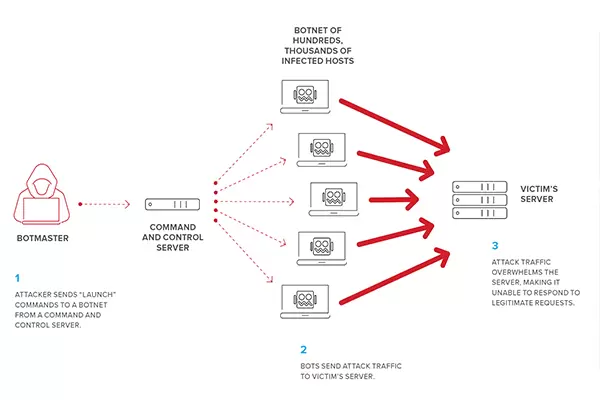
DDoS attacks are carried out using networks of Internet-connected machines. These networks include computers and other devices (such as IoT devices) infected with malware that allows attackers to control them remotely. Each individual device is called a bot, and a network of bots is called a botnet. Once a botnet is established, the attacker can launch an attack by sending remote instructions to each bot.
When a victim’s server or network is targeted by a botnet, each bot sends requests to the target’s IP address, potentially overloading the server or network and causing denial of service for normal traffic. Because each bot is a legitimate Internet device, distinguishing attack traffic from regular traffic is difficult.
Difference Between DDoS and DoS Attacks
A DDoS (Distributed Denial of Service) attack should not be confused with a DoS (Denial of Service) attack. While the difference is only the letter “D,” these attacks are fundamentally different. The distinctions are as follows:
-
A typical DDoS attack manipulates multiple distributed network devices between the attacker and the victim to execute an unwitting attack that exploits legitimate behavior.
-
A traditional DoS attack does not use many distributed devices, nor does it focus on devices between the attacker and the organization. These attacks also tend not to use many Internet-connected devices.
-
Each DoS attack exploits weaknesses in software or the core of a specific server. To address the issue, you can either patch the hosting server or filter traffic. If you can upgrade a server to mitigate an attack, it does not qualify as a traditional DDoS attack.
How to Tell if You’re Under a DDoS Attack
The signs of a DDoS attack can sometimes resemble ordinary issues, such as technical problems with a specific network or routine maintenance by a system administrator. However, the following symptoms may indicate a DoS or DDoS attack:
-
Unusually slow network performance (e.g., opening files or accessing websites)
-
A specific website becomes unavailable
-
Inability to access any websites
The best way to detect and identify a DDoS attack is through network traffic monitoring and analysis. Network traffic can be monitored via firewalls or intrusion detection systems. Administrators can also set up rules to trigger alerts when unusual traffic loads are detected, identify the source of the traffic, or filter network packets that meet certain criteria.
What to Do During a DDoS Attack
If you suspect a DDoS attack, take the following steps:
- Contact your network administrator to confirm whether the service outage is due to maintenance or an internal network issue. Network administrators can also monitor traffic to confirm an attack, identify its origin, and mitigate it by applying firewall rules or rerouting traffic through a security-as-a-service solution that protects against DoS attacks.

- Reach out to your ISP to check if their network is down or if their network is under attack and you are an indirect victim. They can advise you on the appropriate course of action.
-
During an attack, do not lose track of your servers, assets, or other services on your network. Many attackers conduct DoS or DDoS attacks to distract attention from their intended target and exploit the opportunity to launch secondary attacks on other services within your network.
Through this NSV article, we hope you gain a comprehensive overview, understand what a DDoS attack is, and know the steps you can take to mitigate this constant threat.
Related posts

How to Shorten Product Development Time: 5 Critical Factors Companies Often Overlook

Modern Product Development: Why Many Manufacturers Still Face Product Launch Delays

What Makes New System Vietnam Different in Your Digital Transformation Journey?

AI Is Smart, But It's Not Enough: Why Virtual Twin Is Becoming the Foundation of Industrial AI